Razer RC30 0287 70.5Wh Replacement Battery for Blade Pro 17 Laptops
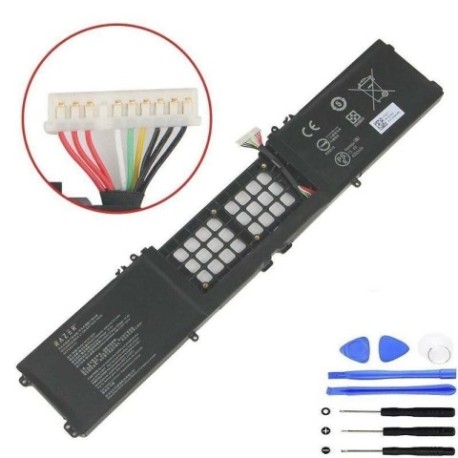
Battery models & part numbers
| Reference / P/N |
|---|
| 4ICP4/62/115 |
| Razer-RC30-0287-70.5Wh |
| RZ09-0287x |
| RZ09-02876 |
| RZ09-02876E92-R341 |
| RZ09-02876E92-R3B1 |
| RZ09-02876E92-R3E1 |
| RZ09-02876E92-R3G1 |
| RZ09-02876E92-R3J1 |
| RZ09-02876E92-R3N1 |
| RZ09-02876E92-R3U1 |
| RZ09-02876E92-R3W1 |
| RZ09-02877 |
| RZ09-02877E92-R341 |
| RZ09-02877E92-R3B1 |
| RZ09-02877E92-R3E1 |
| RZ09-02877E92-R3G1 |
| RZ09-02877E92-R3J1 |
| RZ09-02877E92-R3N1 |
| RZ09-02877E92-R3U1 |
| RZ09-02877E92-R3W1 |
| RZ09-02878 |
| RZ09-02878E92-R341 |
| RZ09-02878E92-R3B1 |
| RZ09-02878E92-R3E1 |
| RZ09-02878E92-R3G1 |
| RZ09-02878E92-R3J1 |
| RZ09-02878E92-R3N1 |
| RZ09-02878E92-R3U1 |
| RZ09-02878E92-R3W1 |
| RZ09-0329x |
| RZ09-03295 |
| RZ09-03295E42-R341 |
| RZ09-03295E42-R3B1 |
| RZ09-03295E42-R3G1 |
| RZ09-03295E42-R3J1 |
| RZ09-03295E42-R3N1 |
| RZ09-03295E42-R3U1 |
| RZ09-03295E42-R3W1 |
| RZ09-03295E63-R341 |
| RZ09-03295E63-R3B1 |
| RZ09-03295E63-R3G1 |
| RZ09-03295E63-R3J1 |
| RZ09-03295E63-R3N1 |
| RZ09-03295E63-R3U1 |
| RZ09-03295E63-R3W1 |
| RZ09-03297 |
| RZ09-03297E42-R341 |
| RZ09-03297E42-R3B1 |
| RZ09-03297E42-R3E1 |
| RZ09-03297E42-R3U1 |
| RZ09-03297E42-R3Y1 |
| RZ09-03297G42-R3G1 |
| RZ09-03297W42-R3W1 |
Compatible laptop models
| Model |
|---|
| Razer Blade 17 Pro 2020 |
| Razer Blade Pro 17 2019 |
| Razer Blade Pro 17 2020 |
| Razer Blade Pro 17 RTX 2080 Max-Q |
Introduction
Keep your Razer Blade Pro 17 performing at its best with our genuine replacement battery. This 70.5Wh power source is specifically designed for your high-performance gaming laptop, ensuring you get the same reliable performance as the original equipment.
Common signs you need a replacement
| Symptom | Cause | Verification | Recommendation |
|---|---|---|---|
| Battery drains quickly (under 1 hour) | Reduced capacity from age/cycles | Check battery health in Windows | Replace battery |
| Laptop won’t power on without charger | Battery no longer holds charge | Test with power adapter removed | Replace battery |
| Battery percentage jumps (e.g., 80% to 20%) | Faulty battery management system | Monitor percentage changes | Replace battery |
| Battery swelling or case bulging | Internal damage or overheating | Visual inspection | Replace immediately – safety risk |
| Overheating during charging | Battery degradation | Check temperature while charging | Replace battery |
How to check compatibility
Verify your laptop model matches one of the compatible models listed above. Check your laptop’s bottom case for the model number or use Windows System Information (type “msinfo32” in Run). Ensure the part number matches our compatibility list for perfect fit and performance.
When to replace
Replace your battery when it shows significant capacity loss (typically after 2-3 years of regular use), won’t hold a charge, shows physical damage, or causes performance issues. Don’t wait until complete failure – proactive replacement prevents