Battery models & part numbers
| Reference / P/N |
|---|
| Samsung AA-PLAN6AB |
| Samsung AA-PLAN9AB/E |
| Samsung BA43-00298A |
| Samsung BA4300299A |
| Samsung BA43-00299A |
| Samsung NP200B |
| Samsung NP400B4B |
| Samsung NP400B4C |
| Samsung NP400B5B |
| Samsung NP400B5C |
| Samsung NP410B2B |
| Samsung NP600B4B |
| Samsung P200 |
| Samsung P210 |
| Samsung P230 |
| Samsung P32R05-48-H01 |
| Samsung P32R10-18-H1 |
| Samsung P400 |
Compatible laptop models
| Model |
|---|
| Samsung NP200B |
| Samsung NP400B4B |
| Samsung NP400B4C |
| Samsung NP400B5B |
| Samsung NP400B5C |
| Samsung NP410B2B |
| Samsung NP600B4B |
| Samsung P200 |
| Samsung P210 |
| Samsung P230 |
| Samsung P400 |
Introduction
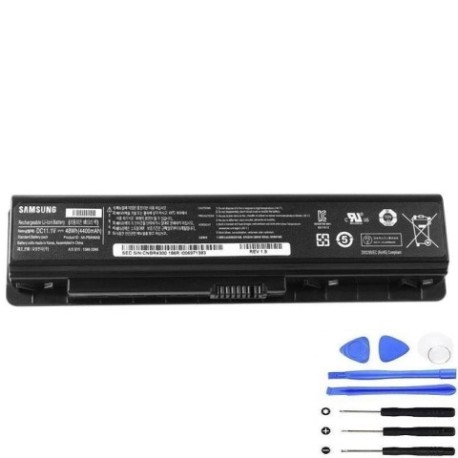
Keep your Samsung laptop running at peak performance with our genuine replacement battery. This 48W power solution is specifically designed for multiple Samsung laptop models commonly used across Australia and New Zealand.
Common signs you need a replacement
| Symptoms | Causes | Verification | Recommendation |
|---|---|---|---|
| Battery drains quickly | Ageing cells, reduced capacity | Check power settings, monitor discharge rate | Consider replacement if under 2 hours |
| Laptop won’t hold charge | Failed battery circuitry | Test with power adapter removed | Immediate replacement needed |
| Battery swelling or overheating | Internal damage, safety hazard | Visual inspection, temperature check | Replace immediately, do not use |
| Inconsistent charging | Worn connectors, faulty BMS | Monitor charging patterns | Replace to prevent damage |
How to check compatibility
Verify your laptop model matches our compatibility list above. Check the label on your current battery for part numbers. For Australian and New Zealand customers, ensure you’re purchasing from authorised retailers to guarantee compatibility and safety standards.
When to replace
Replace your battery when you notice significant performance decline, typically after 2-3 years of regular use. In AU/NZ climates, extreme temperatures can accelerate battery degradation, so monitor performance closely.
Installation guide (overview)
Power off your laptop and disconnect the AC adapter. Remove the battery compartment cover, disconnect the old battery, and insert the new one securely. Always follow manufacturer guidelines and consider professional installation if unsure.
Usage & care tips
Avoid extreme temperatures – store between 15-25°C. Calibrate your battery monthly by fully charging and discharging. Don’t leave your laptop plugged in constantly. Optimal charging range: 20-80% for daily use.
Safety & recycling in AU/NZ
In Australia and New Zealand, dispose of old batteries at authorised recycling centres. Never dispose of in household waste. Look for Battery Stewardship Council approved drop-off points. Damaged batteries should be handled by professionals.
FAQ
How long does shipping take in Australia?
Most orders arrive within 3-7 business days depending on your location.
Is this battery compatible with my Samsung laptop?
Check the compatibility tables above – if your model is listed, it’s compatible.
What warranty do you offer?
We provide 12 months warranty on all batteries sold in Australia and New Zealand.
Can I install this battery myself?
Yes, most Samsung laptops have user-replaceable batteries. Follow our installation guide or consult a professional.
How do I recycle my old battery in NZ?
Take it to any authorised recycling centre – many electronics retailers offer free battery recycling services.
What’s the battery capacity?
This is a 48W battery designed to provide optimal performance for compatible Samsung laptops.
Do you ship to regional areas?
Yes, we ship throughout Australia and New Zealand, including regional and remote areas.