Samsung AA PLVN4AR 55Wh Laptop Battery Replacement
Find the perfect replacement battery for your Samsung laptop with our comprehensive compatibility guide. This 55Wh battery is designed specifically for various Samsung ATIV Book and Ultrabook models.
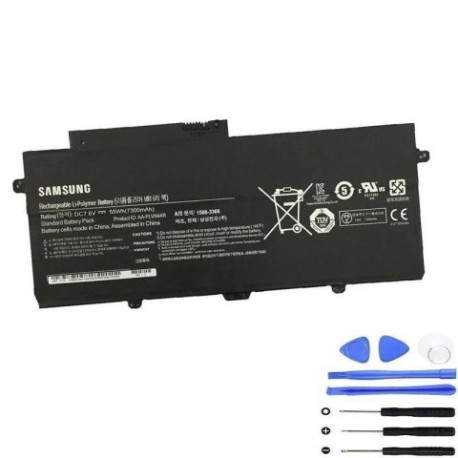
Battery models & part numbers
| Reference / P/N |
|---|
| BA4300364A |
| BA43-00364A |
| Samsung-AA-PLVN4AR-55Wh |
Compatible laptop models
| Model |
|---|
| Samsung 15.6 NP910S5J |
| Samsung 910S5J |
| Samsung 940X3G |
| Samsung ATIV Book 9 Plus 940X3G Ultrabook |
| Samsung ATIV Book 9 style 910S5J |
| Samsung Ativ Book 9 Plus NP940X3G |
| Samsung NP910S5J |
| Samsung NP910S5J-K01 |
| Samsung NP910S5J-K02 |
| Samsung NP910S5J-K03 |
| Samsung NP910S5J-K04 |
| Samsung NP910S5J-K05 |
| Samsung NP910S5J-K07 |
| Samsung NP930X3G-K02 |
| Samsung NP930X3G-K05 |
| Samsung NP940X3G |
| Samsung NP940X3G-K01 |
| Samsung NP940X3G-K02 |
| Samsung NP940X3G-K03 |
| Samsung NP940X3G-K04 |
| Samsung NP940X3G-K05 |
| Samsung NP940X3G-S01 |
| Samsung Np940x3k |
| Samsung NT910S5J |
| Samsung NT930X3G |
Introduction
The Samsung AA PLVN4AR 55Wh battery is a high-quality replacement designed to restore your laptop’s mobility and performance. This genuine-compatible battery meets or exceeds original specifications and is backed by comprehensive testing.
Common signs you need a replacement
| Symptoms | Causes | Verification | Recommendation |
|---|---|---|---|
| Battery won’t hold charge | Ageing cells, deep discharge | Check battery health in system settings | Replace if capacity below 60% |
| Laptop shuts down unexpectedly | Voltage drops under load | Monitor battery percentage during use | Replace if sudden shutdowns occur |
| Battery swelling or overheating | Internal damage, overcharging | Visual inspection, temperature check | Replace immediately for safety |
| Charging time significantly increased | Reduced battery efficiency | Time full charge cycle | Replace if charging takes 4+ hours |
How to check compatibility
Verify your laptop model matches one of the compatible models listed above. Check your laptop’s bottom label or system information (Windows: type “system information” in search; Mac: Apple menu > About This Mac). Cross-reference the model number with our compatibility table.
When to replace
Consider replacement when your battery lasts less than 2 hours on a full charge, shows “replace soon” warnings, or is over 2-3 years old with regular use. Most laptop batteries have a lifespan of 300-500 charge cycles.
Installation guide (overview)
1. Power off laptop and disconnect charger
2. Remove bottom panel screws
3. Carefully disconnect old battery connector
4. Remove old battery
5. Install new battery and reconnect
6. Replace bottom panel and power on
7. Allow full charge cycle before first use
Usage & care tips
• Avoid extreme temperatures (ideal range 10°C to 35°C)
• Calibrate battery monthly: fully charge, then discharge completely
• Store at 40-60% charge if not using for extended periods
• Use authorised chargers only
• Keep battery contacts clean
Safety & recycling in AU/NZ
In Australia and New Zealand, laptop batteries must be recycled through authorised e-waste collection centres. Never dispose of batteries in household waste. Many electronics retailers offer free battery recycling services. Damaged or swollen batteries should be handled with care and taken to specialised recycling facilities.
FAQ
How long does this battery last on a full charge?
Up to 4-6 hours depending on usage and laptop settings.
Is this battery genuine Samsung?
This is a high-quality compatible battery that meets original specifications.
What warranty is included?
Typically 12 months warranty from authorised sellers.
How do I know if my laptop model is compatible?
Check the bottom label of your laptop and compare with our compatibility table above.
Can I install this battery myself?
Yes, most Samsung laptops have user-replaceable batteries with basic tools.
How should I dispose of my old battery?
Take it to an authorised e-waste recycling centre in your area.
What if my laptop isn’t in the compatibility list?
Double-check your model number and contact the seller for confirmation.