Sony VGP-BPS21A 54Wh Battery Replacement
Find the perfect replacement battery for your Sony Vaio laptop with our comprehensive compatibility guide for Australian and New Zealand customers.
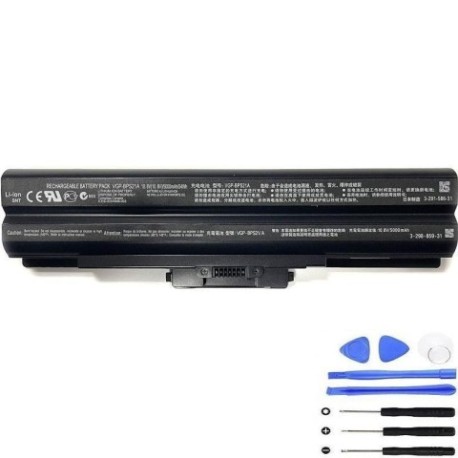
Battery models & part numbers
| Reference / P/N |
|---|
| Sony-VGP-BPS21A-54Wh |
| VGP-BPL21 |
| VGP-BPS21 |
| VGP-BPS21 A |
| VGP-BPS21 B |
| VGP-BPS21 S |
| VGP-BPS21/S |
| VGP-BPS21A |
| VGP-BPS21A B |
| VGP-BPS21A/B |
Compatible laptop models
| Model |
|---|
| Sony Vaio SVJ20215CXW |
| Sony Vaio SVJ20217CXW |
| Sony Vaio SVJ20218CJW |
| Sony Vaio SVJ20219CJW |
| Sony Vaio Tap 20s |
| SVJ20217CJW |
| SVJ20217CXW |
| SVJ20218CJW |
| SVJ20219CJW |
Introduction
If your Sony Vaio laptop is showing signs of battery fatigue, our authorised replacement batteries provide reliable power restoration for Australian and New Zealand users.
Common signs you need a replacement
| Symptoms | Causes | Verification | Recommendation |
|---|---|---|---|
| Rapid power drain | Aged battery cells | Check battery health in system settings | Replace battery |
| Laptop won’t hold charge | Failed battery circuitry | Test with power adapter removed | Immediate replacement needed |
| Battery swelling | Internal chemical breakdown | Visual inspection | Stop using immediately |
| Overheating during use | Inefficient power delivery | Monitor temperature readings | Replace to prevent damage |
How to check compatibility
Locate your laptop model number on the bottom casing or battery compartment. Cross-reference with our compatibility tables above. For Sony Vaio models, the battery part number is typically printed on the original battery.
When to replace
Replace your battery when runtime drops below 50% of original capacity, when swelling occurs, or if the laptop fails to operate on battery power alone. Most laptop batteries last 2-3 years with regular use.
Installation guide (overview)
Power off your laptop and disconnect the AC adapter. Remove the old battery by releasing the locking mechanism. Align the new battery with the connectors and secure it in place. Allow the battery to charge fully before first use.
Usage & care tips
Store batteries at room temperature (15-25°C). Avoid complete discharges – recharge when battery reaches 20-30%. Calibrate your battery monthly by fully charging then discharging. Keep contacts clean and dry.
Safety & recycling in AU/NZ
In Australia and New Zealand, lithium-ion batteries must be recycled at authorised collection centres. Never dispose of batteries in household waste. Check with your local council for battery recycling programmes. Damaged or swollen batteries should be handled with care and taken to specialised recycling facilities.
FAQ
How long does shipping take to AU/NZ?
Most orders arrive within 7-10 business days to major Australian and New Zealand cities.
Is this battery genuine Sony?
Our batteries are high-quality replacements that meet or exceed original specifications, providing reliable performance for your Sony Vaio.
What warranty do you offer?
All our batteries come with a 12-month warranty covering manufacturing defects.
Can I use this battery with different Vaio models?
Only use with compatible models listed in our tables. Using incompatible batteries may damage your device.
How do I maximise battery life?
Avoid extreme temperatures, don’t leave laptop plugged in constantly, and perform regular calibration cycles.
What if my model isn’t listed?
Contact our support team with your laptop’s exact model number for compatibility verification.
Do you provide installation services?
We provide detailed installation guides, but recommend professional installation if you’re unsure about the process.