Battery models & part numbers
| Reference / P/N |
|---|
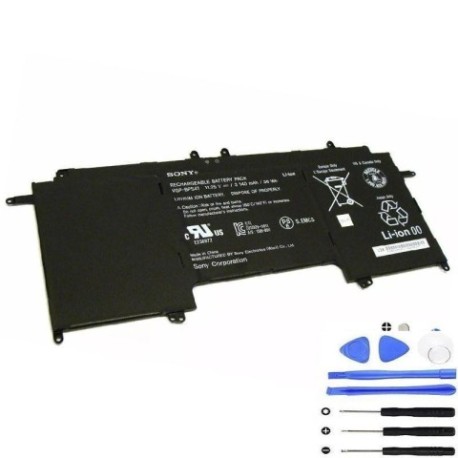
| Sony-VGP-BPS41-36Wh |
Compatible laptop models
| Model |
|---|
| Sony Vaio Fit 13A |
| Sony Vaio Fit 13A Flip PC |
| Sony Vaio SVF13N17PXB |
| Sony Vaio SVF13N19DJS |
| Sony Vaio SVF13N1A1J |
| Sony Vaio SVF13N1C4E |
| Sony Vaio SVF13N1C5E |
| Sony Vaio SVF13N1D4E |
| Sony Vaio SVF13N1J2E |
| Sony Vaio SVF13N1J2R |
| Sony Vaio SVF13N1L2E |
| Sony Vaio SVF13N1L2R |
| Sony Vaio SVF13N1X2E |
| Sony Vaio SVF13N1X2R |
| Sony Vaio SVF13N1Y9E |
| Sony Vaio SVF13N22CG |
| Sony Vaio SVF13N22SA |
| Sony Vaio SVF13N22SG |
| Sony Vaio SVF13N23CXB |
| Sony Vaio SVF13N23CXS |
| Sony Vaio SVF13N24CXB |
| Sony Vaio SVF13N25CG |
| Sony Vaio SVF13N25SH |
| Sony Vaio SVF13N26PG |
| Sony Vaio SVF13N27PA |
| Sony Vaio SVF13N27PG |
| Sony Vaio SVF13N27PXB |
| Sony Vaio SVF13N27PXS |
| Sony Vaio SVF13N290X |
| Sony Vaio SVF13N29EJS |
| Sony Vaio SVF13N2A1J |
| Sony Vaio SVF13N2A4E |
| Sony Vaio SVF13N2A4R |
| Sony Vaio SVF13N2B4E |
| Sony Vaio SVF13N2B4R |
| Sony Vaio SVF13N2C4R |
| Sony Vaio SVF13N2C5E |
| Sony Vaio SVF13N2D4E |
| Sony Vaio SVF13N2D4R |
| Sony Vaio SVF13N2F4R |
| Sony Vaio SVF13N2G4R |
| Sony Vaio SVF13N2H4R |
| Sony Vaio SVF13N2J2E |
| Sony Vaio SVF13N2J2R |
| Sony Vaio SVF13N2J4R |
| Sony Vaio SVF13N2L2E |
| Sony Vaio SVF13N2L2R |
| Sony Vaio SVF13N2M2E |
| Sony Vaio SVF13N2X2R |
| Sony Vaio SVF13N2Y2E |
| Sony Vaio SVF13N2Y9E |
Introduction
Keep your Sony Vaio Fit 13A series running smoothly with a genuine replacement battery. This guide helps AU/NZ users identify compatibility, recognise replacement signs, and install safely.
Common signs you need a replacement
| Symptom | Cause | Verification | Recommendation |
|---|---|---|---|
| Short battery life | Ageing cells | Check power settings | Replace if under 2 hours |
| Laptop shuts down unexpectedly | Voltage drops | Monitor battery health | Replace immediately |
| Battery not charging fully | Faulty circuitry | Use diagnostic tools | Inspect and replace |
| Physical swelling | Internal damage | Visual check | Replace urgently |
How to check compatibility
Match your laptop model from the list above. Verify the part number Sony-VGP-BPS41-36Wh on your old battery or in system info.
When to replace
Replace every 2–3 years or when performance declines. In AU/NZ, authorised centres can test battery health accurately.
Installation guide (overview)
Power off and unplug. Remove the old battery, align the new one, and secure it. Always follow manufacturer guidelines.
Usage & care tips
Avoid extreme temperatures; store between 10°C and 30°C. Calibrate monthly for optimal performance. Use original chargers.
Safety & recycling in AU/NZ
Dispose of old batteries at approved recycling centres. Never expose to fire or water. Check local council guidelines.
FAQ
How long does delivery take in Australia? Typically 3–7 business days.
Is this battery genuine? Yes, it meets Sony specifications.
Can I install it myself? Yes, with basic tools and care.
What is the warranty? Usually 12 months from purchase.
How do I recycle the old battery? Use council e-waste services.
Does it work with all SVF13N models? Yes, as listed above.