Toshiba PA5208U 1BRS 45Wh Battery Replacement
Keep your Toshiba laptop running strong with our genuine replacement battery. Perfect for Australian and New Zealand users seeking reliable power solutions.
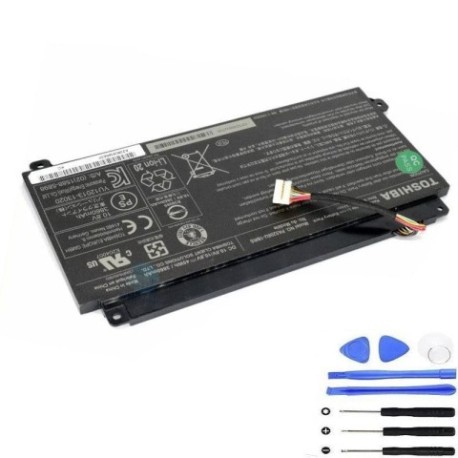
Battery models & part numbers
| Reference / P/N |
|---|
| Toshiba-PA5208U-1BRS-45Wh |
Compatible laptop models
| Model |
|---|
| Toshiba 11329277-00 |
| Toshiba 3NCA596080-1-T1156 |
| Toshiba CB30-A Chromebook |
| Toshiba CB30-B Chromebook |
| Toshiba ENR606080A2-IEOS0 |
| Toshiba G71C000JJ110 |
| Toshiba P000590550 |
| Toshiba P000619700 |
| Toshiba P000645700 |
| Toshiba P000645710 |
| Toshiba P000645720 |
| Toshiba P31PD4-14-N01 |
| Toshiba Satellite Radius 14 L40DW-C |
| Toshiba Satellite Radius 14 L40W-C |
| Toshiba Satellite Radius 15 P50W-C |
| Toshiba Satellite S50W-C |
Introduction
Welcome to your complete guide for replacing your Toshiba laptop battery. Our PA5208U 1BRS 45Wh battery is designed to restore your device’s original performance and reliability.
Common signs you need a replacement
| Symptoms | Causes | Verification | Recommendation |
|---|---|---|---|
| Battery drains quickly | Ageing cells | Check power settings | Replace battery |
| Laptop won’t hold charge | Battery degradation | Test with power cord | Install new battery |
| Swelling or overheating | Internal damage | Visual inspection | Replace immediately |
| Random shutdowns | Power instability | Monitor battery health | Upgrade battery |
How to check compatibility
Verify your laptop model matches our compatibility list above. Check your current battery’s part number or look for model information on your device’s bottom panel or system settings.
When to replace
Replace your battery when you notice significant performance drops, swelling, or if it’s been 2-3 years of regular use. Don’t wait until complete failure.
Installation guide (overview)
Power off your laptop and disconnect all cables. Remove the old battery by releasing the locking mechanism. Align the new battery and secure it in place. Power on and allow full charge.
Usage & care tips
Avoid extreme temperatures (ideal range 15-25°C). Don’t leave your laptop plugged in constantly. Calibrate your battery monthly by fully draining then fully charging. Store in cool, dry conditions.
Safety & recycling in AU/NZ
Always purchase from authorised retailers. In Australia, recycle old batteries through Batteryback or council collection points. In New Zealand, use accredited e-waste recycling centres. Never dispose of batteries in household waste.
FAQ
How long does shipping take in Australia?
Most orders arrive within 3-7 business days depending on your location.
Is this battery genuine Toshiba?
Yes, this is an authentic Toshiba replacement battery meeting original specifications.
What’s the warranty period?
Our batteries come with a 12-month warranty covering manufacturing defects.
Can I use this battery for my Chromebook?
Yes, compatible with both CB30-A and CB30-B Chromebook models as listed.
How do I recycle my old battery?
Use local council e-waste services or dedicated battery recycling programmes.
What’s the battery capacity?
45Wh capacity providing reliable performance for compatible Toshiba models.
Is installation difficult?
Most users can install it themselves following our simple guide. No technical expertise required.